 Rowdate
Your sheet rows, on your calendar. Kept in sync.
Tablondaki satırlar, takviminde. Hep güncel.
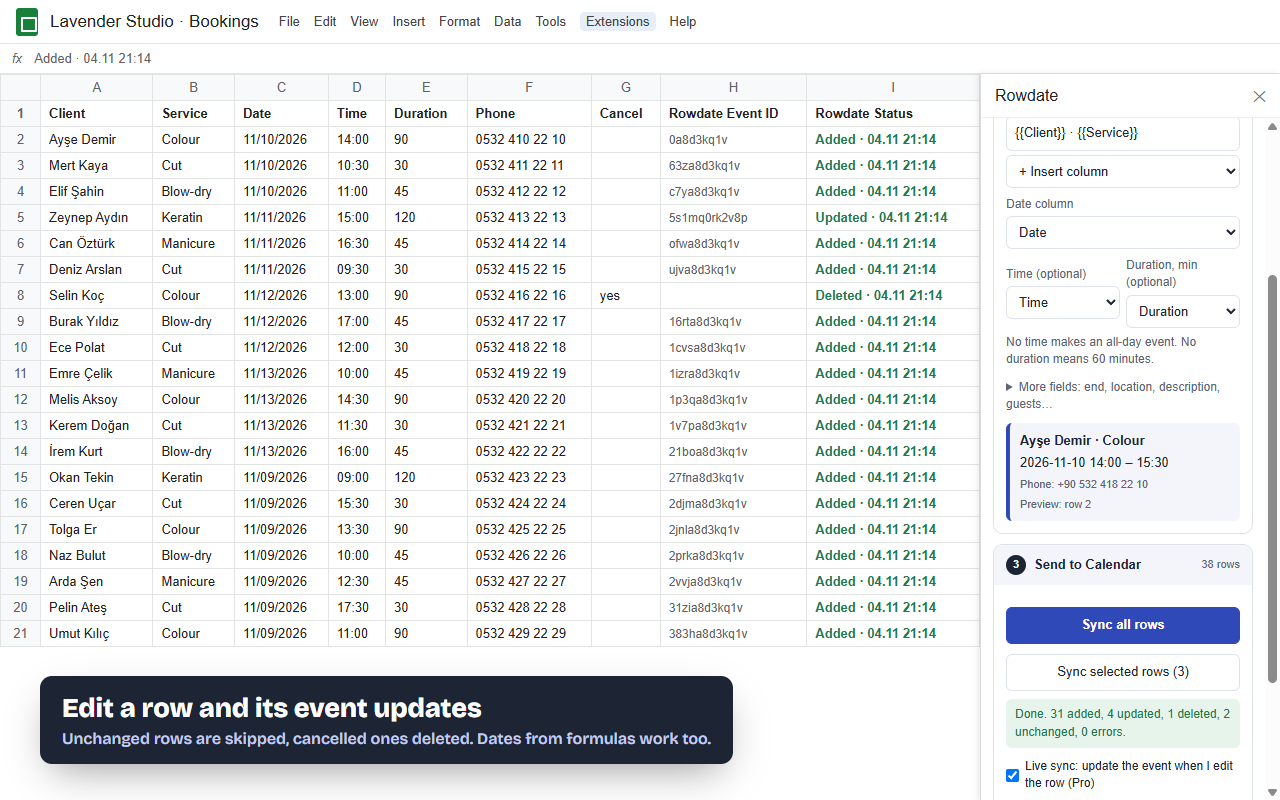
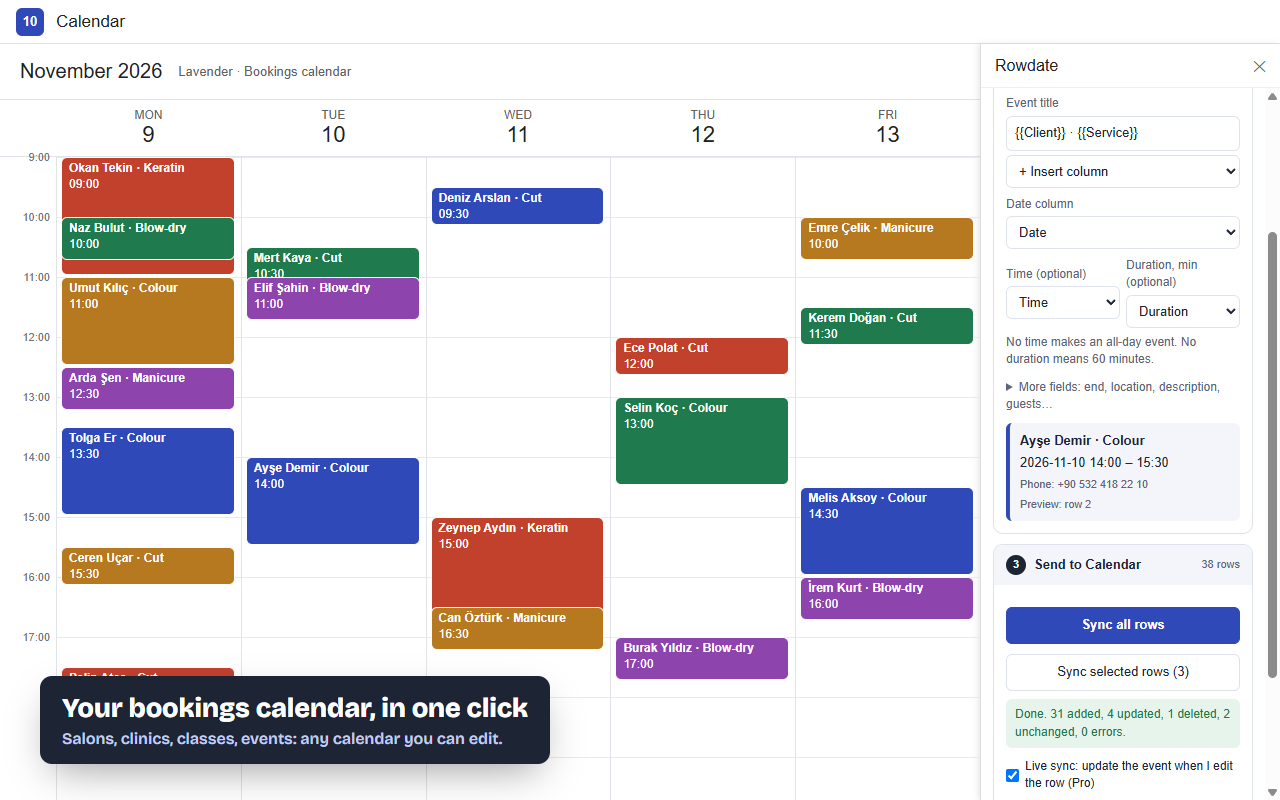
Rowdate turns Google Sheets rows into Google Calendar events. Change a time in the sheet and the event moves. Mark a row cancelled and the event goes away.
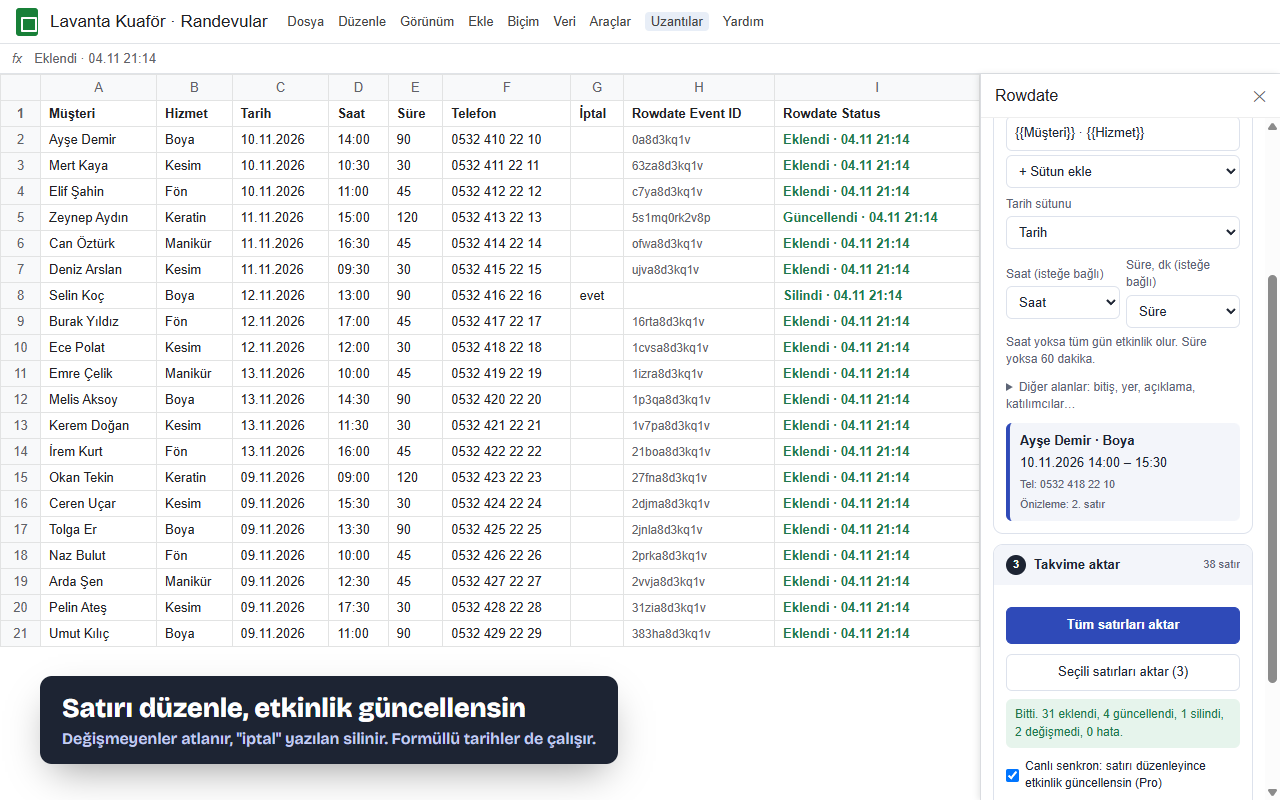
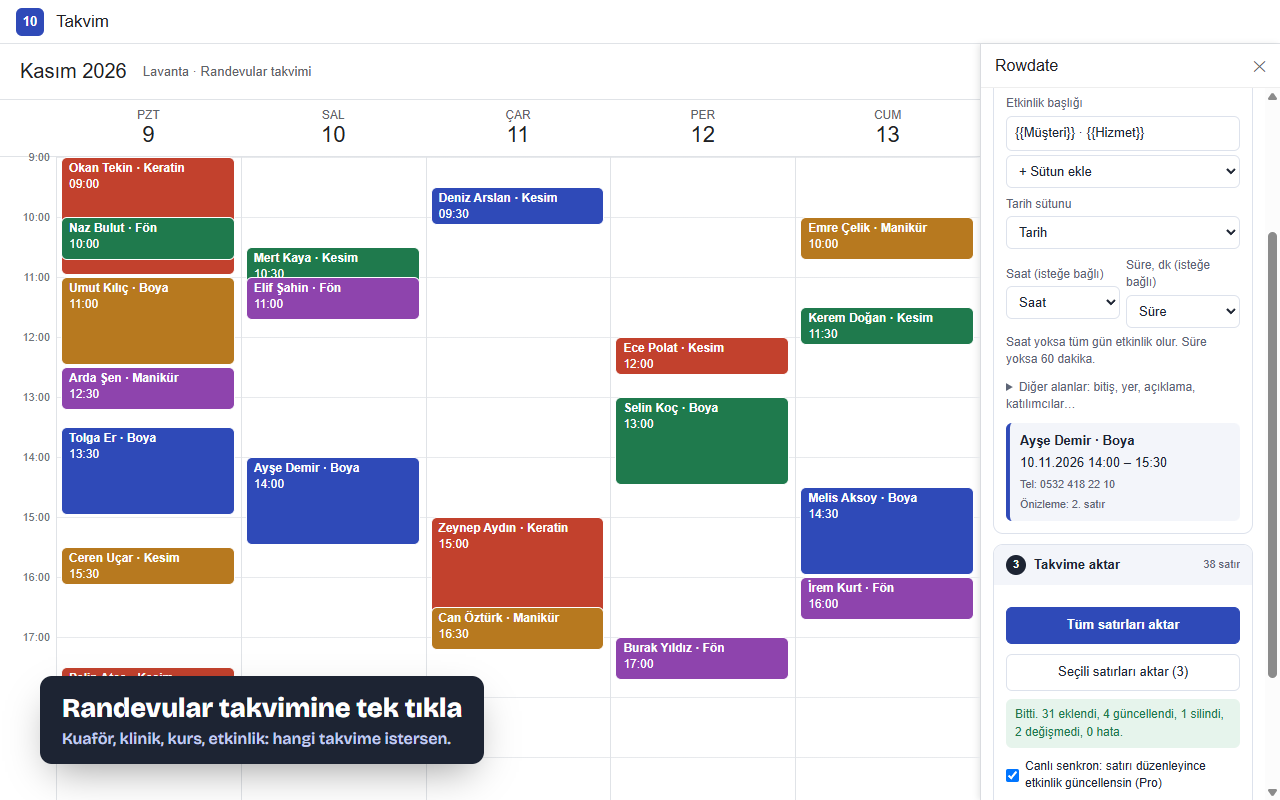
Rowdate, Google E-Tablolar satırlarını Google Takvim etkinliğine çevirir. Tabloda saati değiştir, etkinlik kayar. Satırı iptal et, etkinlik silinir.
100 events a month free. The price is on this page, no hidden trial.
Ayda 100 etkinlik ücretsiz. Fiyat bu sayfada yazıyor, gizli deneme süresi yok.
Three steps, no copying
Üç adım, kopyala-yapıştır yok
Pick a calendar
Takvimi seç
Your own or any shared calendar you can edit.
Kendi takvimin ya da düzenleyebildiğin ortak bir takvim.
Match your columns
Sütunları eşle
Title, date, time, duration. Rowdate guesses them from your headers and shows a preview.
Başlık, tarih, saat, süre. Rowdate başlıklardan tahmin eder, önizleme gösterir.
Sync
Aktar
Each row gets its event ID and status. Next time only changed rows are sent.
Her satıra etkinlik ID'si ve durum yazılır. Sonraki seferde yalnız değişen satırlar gider.
Built for the things that break elsewhere
Başka eklentilerde bozulan şeyler için yapıldı
We read the one-star reviews of the other Sheets-to-Calendar add-ons. These are the fixes.
Diğer Tablo→Takvim eklentilerinin tek yıldızlı yorumlarını okuduk. Çözümler bunlar.
- Dates from formulas workFormülle gelen tarihler çalışır =A2+7, =WORKDAY(), imported data: if Sheets shows a date, Rowdate reads it.=A2+7, =İŞGÜNÜ(), içe aktarılan veri: Sheets tarih gösteriyorsa Rowdate okur.
- Edits update, not duplicateDüzenleme kopya değil, güncelleme yapar Each row remembers its event. Change the row, the same event changes.Her satır kendi etkinliğini hatırlar. Satırı değiştir, aynı etkinlik değişir.
- Cancel deletesİptal silme yapar Put "yes" in a cancel column and the event is removed from the calendar.İptal sütununa "evet" yaz, etkinlik takvimden kalkar.
- Clear errors, per rowSatır satır anlaşılır hata "Date not recognised: 32.13.2026" in the row itself, not a silent failure."Tarih anlaşılmadı: 32.13.2026" satırın kendisinde yazar, sessizce başarısız olmaz.
- Any date styleHer tarih biçimi 2026-11-10, 10.11.2026, 11/10/2026 by your sheet's locale, with or without time.2026-11-10, 10.11.2026, 11/10/2026 tablonun diline göre; saatli ya da saatsiz.
- Narrow permissionsDar izinler Only the open spreadsheet and calendar events. No Gmail, no Drive, no servers of ours.Yalnız açık tablo ve takvim etkinlikleri. Gmail yok, Drive yok, bizim sunucumuz yok.
Pricing
Fiyat
Start free. Pay only if you sync more than 100 events a month or want live sync.
Ücretsiz başla. Ayda 100'den fazla etkinlik ya da canlı senkron istersen öde.
Free
Ücretsiz
- 100 new events a month
- Updates and deletes included
- All fields: guests, colours, repeats
- Ayda 100 yeni etkinlik
- Güncelleme ve silme dahil
- Tüm alanlar: katılımcı, renk, tekrar
Pro
- Unlimited events
- Live sync: edit a row, the event follows
- Or $5 a month
- Sınırsız etkinlik
- Canlı senkron: satırı düzenle, etkinlik gelsin
- Ya da ayda $5
Lifetime
Ömür boyu
- Everything in Pro, forever
- For the twice-a-year big import
- One key, up to 3 Google accounts
- Pro'daki her şey, süresiz
- Yılda iki kez büyük aktarım yapanlar için
- Tek anahtar, 3 Google hesabına kadar
Questions
Sorular
Does it work with formulas and imported data?
Formüllerle ve içe aktarılan veriyle çalışır mı?
Yes. Rowdate reads the value Sheets calculated, in your spreadsheet's time zone. Text dates like 10.11.2026 or 2026-11-10 14:30 work too.
Evet. Rowdate, Sheets'in hesapladığı değeri tablonun saat diliminde okur. 10.11.2026 ya da 2026-11-10 14:30 gibi metin tarihler de çalışır.
What happens if I delete an event in Calendar?
Etkinliği takvimden silersem ne olur?
The next sync creates it again from the row. The sheet is the source of truth; to remove an event, use the cancel column.
Sonraki senkronda satırdan yeniden oluşturulur. Esas kaynak tablodur; etkinliği kaldırmak için iptal sütununu kullan.
Can it send invitations?
Davet gönderebilir mi?
Yes, if you map a guest email column and tick "Email invitations to guests". Otherwise guests are added silently.
Evet; katılımcı e-posta sütununu seçip "Katılımcılara davet e-postası gönder"i işaretlersen. Yoksa katılımcılar sessizce eklenir.
Where is my data stored?
Verim nerede saklanıyor?
In your spreadsheet and your calendar. Rowdate runs inside Google Apps Script and only talks to the Google Calendar API and our license checker.
Tablonda ve takviminde. Rowdate Google Apps Script içinde çalışır; yalnızca Google Takvim API'si ve lisans kontrolüyle konuşur.
Refunds?
İade?
Email us within 14 days of your first payment for a full refund. You can cancel any time.
İlk ödemeden sonraki 14 gün içinde yaz, tam iade yaparız. İstediğin an iptal edebilirsin.